
Push notifications
Matrix clients receive notifications in the following ways:
- In-band notifications, which are shown when the client actively syncs with the server.
- Push notifications, which are posted to the client by the server through an external push service. This is typically used to send out-of-band notifications to mobile devices, and it is the focus of this page.
Generally, your mobile device is preconfigured for push notifications out of the box. The details below are for advanced use cases, such as using an alternative push backend (like UnifiedPush) or hosting your own.
Overview
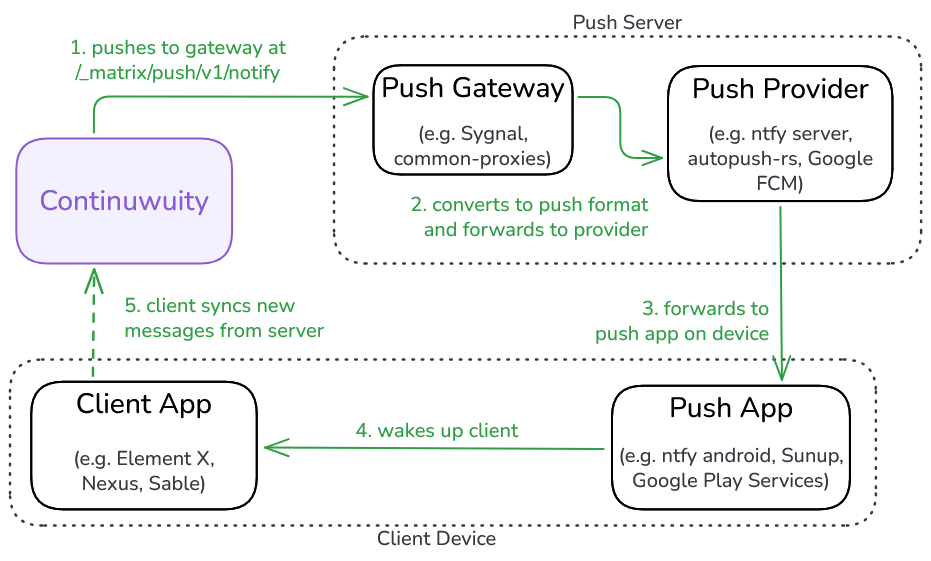
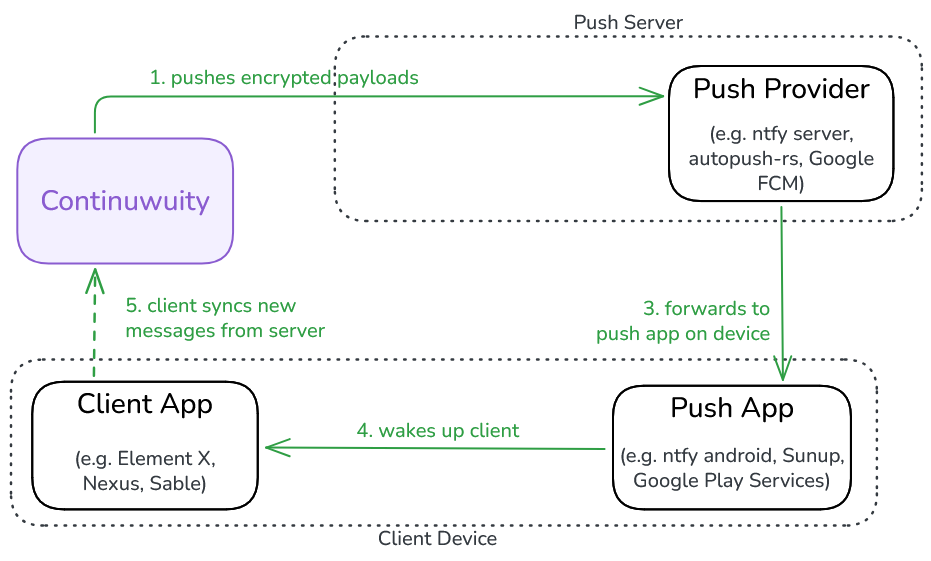
Continuwuity supports two push methods: the legacy Matrix Push Gateway and the new Web Push protocol. The former is currently supported by more clients, but the latter enables end-to-end-encrypted push notifications. They work as follows:
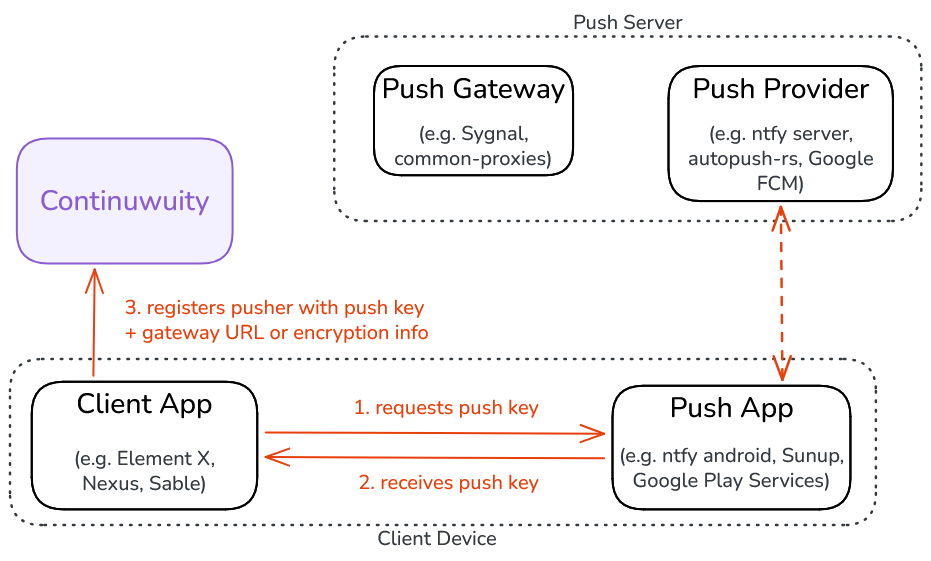
- A client app obtains a push key from the push app that it hooks up to.
- Then, it registers a pusher with Continuwuity, bringing along the push key and the following additional information:
- For the Push Gateway method: The push gateway URL, which is provided by the client.
- For the Web Push method: Some encryption details generated by the client, so the server knows how to encrypt its push payloads.
(excalidraw file of the diagrams)
Therefore, Continuwuity's role within this system is to keep track of client-registered pushers and send relevant payloads to them. To view and manage these pushers, use the !admin query pusher set of commands.
UnifiedPush
UnifiedPush is an open and self-hostable notifications system that is supported by many Matrix clients on Android and Linux. It is compatible with both the Web Push and Push Gateway mechanisms, and therefore requires no additional setup from the homeserver.
To debug and test your UnifiedPush installation, use the UP-Example app for Android and the UnifiedPush Troubleshooter app for Linux distributions.
UnifiedPush and push gateways
The push gateway URL is usually pre-configured by the client app. However, some clients (such as Element X) implement UnifiedPush's Gateway Discovery mechanism, and attempt to detect a push gateway on the same domain as the push provider, before falling back to a hardcoded one.
Per the spec, these push gateways must be available on the /_matrix/push/v1/notify path of said domain. To test that a push gateway is accessible to the homeserver, make a request for it from the homeserver's IP:
ntfy
ntfy is a widely supported UnifiedPush implementation, with an easy-to-install push app and plenty of publicly available instances. Its server includes an embedded Matrix push gateway and can be self-hosted.
Some tutorials on self-hosting ntfy can be found below:
Avoid using the https://ntfy.sh push server, which is configured as the default in the ntfy app. This server is known to ratelimit requests aggressively.
Other UnifiedPush distributors
To find a list of other UnifiedPush distributors, visit this page.
Community tutorials for selfhosting some of these stacks are listed below. Unless stated otherwise, they are all tested against Element X Android and the push gateway mechanism, but they should work with Web Push as well.
- Self-hosting Sunup for Matrix and UnifiedPush, by Kimiblock.
- Push gateway: common-proxies
- Push server: autopush-rs
- Push app: Sunup
- Matrix notifications on Android, powered by XMPP, by stratself.
- Push gateway: common-proxies
- Push server: ejabberd's mod_unified_push
- Push app: Conversations (and forks)
- Element X push notifications via Conversations, by Alfredo Lin.
- Push gateway: common-proxies
- Push server: Prosody's mod_unified_push
- Push app: Conversations
- Nextcloud's NextPush flow, which uses the following stack:
- Push server + push gateway: uppush (selfhosting tutorial included)
- Push app: NextPush Android
Troubleshooting
Issues with push notifications can arise from the components of the system beyond your homeserver (for example, if the connection fails between the gateway and the push server). Make sure you check the logs of these components for debugging as well.
Locally hosted push gateways / push providers
Outbound requests, including push notifications, follows the ip_range_denylist config option which refuses loopback and private-range destinations by default. This would break against push components that are self-hosted on a LAN address, and will result in these log entries at push creation time:
To fix this, remove your push gateway or push server's address from ip_range_denylist, and restart Continuwuity to apply the changes.
Push notifications not audible/not displaying
This is likely an issue with your account's push rules, which determines which events are shown to to the user as notifications. Check these push rules in the client's notifications settings and tweak accordingly. Continuwuity also provides an !admin users reset-push-rules command, which restores the rules to the default of notifying for every message.
Another reason may be that push background services are frequently being terminated by your operating system, which is a well-known problem with many Android-based systems. To fix this, follow your operating system's instructions to exempt your push app from background restrictions.
Otherwise, if you find Continuwuity not sending push notifications according to the spec, feel free to discuss in our support room or open an issue.
Various "Could not send request to pusher" log entries
If you find spurious log entries like this in your Continuwuity deployment:
Then, your server is most likely sending push requests to too many invalid targets. This could be due to one of the following reasons:
Connection issues between the server and the push gateway
Verify that the connection to the push gateway is working correctly. This includes checking firewall rules, DNS, and that the push gateway is online. The section on locally-hosted gateways/push providers may also apply to you.
Expired push endpoints
Active Matrix clients periodically renew their pushkeys as the old ones expire, and consequently register them against Continuwuity. As these pushers build up over time, the homeserver will keep sending more requests to an increasing number of "dead" push endpoints. This results in the errors seen above, and can heavily impact performance if not mitigated.
To work around this issue, the following actions can be taken:
- Delete all of a user's pushers with the
!admin query pusher delete-all-usercommand. This command is not typically disruptive, as active clients will re-register new pushers the next time they log on. - Alternatively, delete one's own pushers from a client that supports doing so. Currently this only includes FluffyChat and Element Classic/SchildiChat Legacy.
While clients are supposed to automatically delete old pushers under their own control, this behaviour has been inconsistent. A further discussion of this issue can be found in #2242.
Related Documentation
Specifications:
- Matrix specification for the Push Gateway API
- Matrix Client-Server API for push notifications
- UnifiedPush specifications
- MSC4174: Web push
- Web Push RFCs
Other:
- Matrix Push Rules and Notifications - blogpost on push rules in Matrix